Meetings are the one knowledge source that doesn't fit into Obsidian. Cloud recorders like Otter and Fireflies store transcripts behind a login, in their own format. Export is a PDF or plain text dump you'd have to reformat.
mono writes recordings directly as markdown files in your vault — YAML frontmatter, AI summary, action item checkboxes, full transcript. No export step, no copy-paste.
TL;DR
- The gap: Meetings are your vault's biggest blind spot — decisions and context that exist nowhere in your PKM system
- The fix: A recorder that writes native .md files directly into your vault folder
- Bases & Dataview-ready: YAML frontmatter with date, duration, tags — queryable with built-in Bases or Dataview
- Tasks-ready: Action items as standard
- [ ]checkboxes, bidirectional sync - Semantic search: Ask questions across all meetings by meaning, not just keywords
What a Meeting Note Looks Like
Imagine you finish a Zoom call. A few seconds later, this file appears in your vault:
That's a real Obsidian note. You can tag it, link it to your project page, add your own annotations between sections. The audio file embeds as a playable audio widget — click play right inside the note to hear the exact tone of a discussion.
The file structure in your vault is clean:
Flat files, sorted by date naturally. Audio tucked away in _audio/ so your sidebar stays clean. No database, no proprietary format. Just markdown and mp3.
Queryable with Bases and Dataview
Every meeting note has standard YAML frontmatter: date, duration, tags, language, and mono_id. Title is derived from the filename. Status is derived from which sections exist (has ## Transcript = transcribed, has ## Notes = summarized). That means two powerful ways to query them.
Obsidian Bases (built-in)
Create a Base, point it at your Meetings folder. You get a sortable, filterable table with columns for date, duration, and tags. Edit properties inline — changes write directly to frontmatter.
Dataview (for power users)
If you prefer queries in code, Dataview works just as well:
All meetings this week tagged #project-alpha:
Meetings longer than 30 minutes that haven't been summarized:
Both approaches work because the underlying data is the same: standard YAML frontmatter. Use Bases for quick visual browsing, Dataview for complex queries embedded in your project pages. Or both.
Action Items That Work with Obsidian Tasks
This is the part that makes the biggest difference in practice.
Meeting action items are standard markdown checkboxes under ### Action Items within the ## Notes section. The format the Tasks plugin already queries natively:
One Tasks query to see every uncompleted action item from every meeting this month:
Check off an item in Obsidian. The recorder app sees the change. Check it off in the recorder app. Obsidian sees the change. Bidirectional — because it's the same file.
No more action items buried inside AI-generated summaries you never re-read. No more "wait, who was supposed to do that?" No more searching through three different tools to find what you committed to last Tuesday.
Why checkboxes, not YAML arrays: Obsidian Tasks queries - [ ] lines. YAML frontmatter arrays are invisible to it. By keeping action items in the body as checkboxes, they work with Tasks out of the box — no configuration, no workarounds.
Embedded Audio Playback
Each meeting note embeds its audio file with Obsidian's standard image/file embed syntax:
Obsidian renders this as a playable audio widget right inside the note. You're reading the transcript, you hit a section where tone matters — a disagreement, a hesitation, a joke that changed the direction of the conversation — and you click play right there.
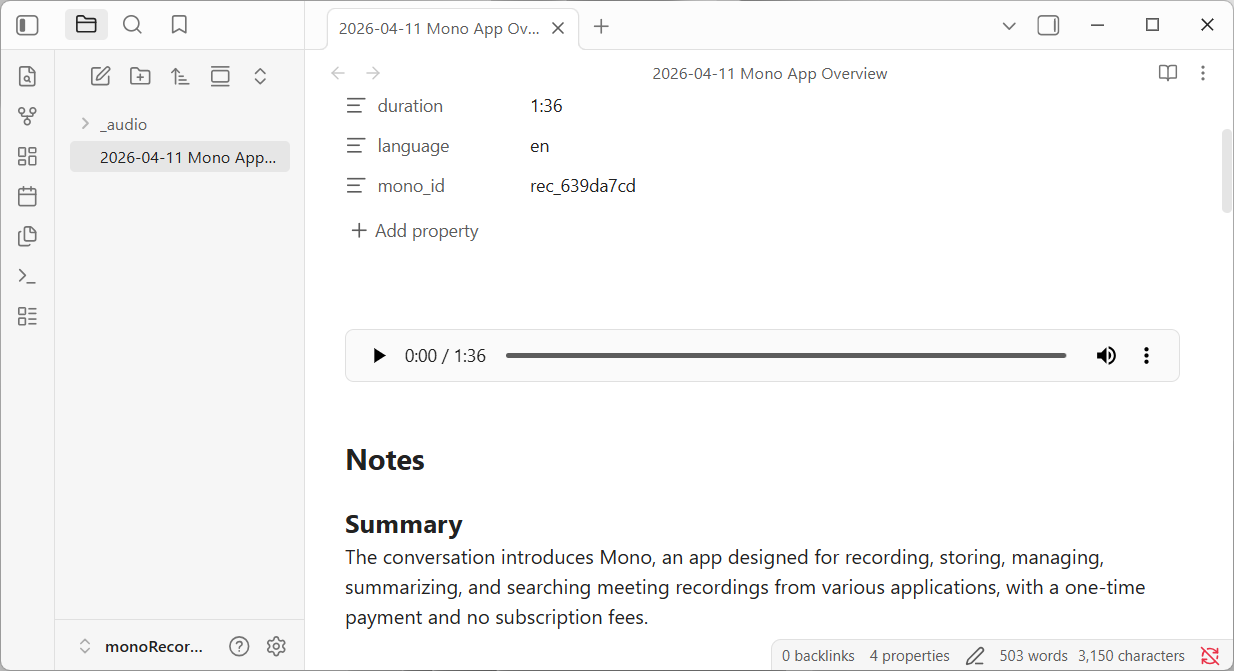
Audio files live in a _audio/ subfolder. The underscore prefix sorts it to the top and out of the way. Your sidebar shows clean, date-sorted note titles, not a mix of markdown and mp3 files.
Semantic Search
mono chunks transcripts and embeds them into a local vector database. Search by meaning, not just keywords:
- "What did we decide about the API timeline?" — finds the discussion even if nobody said "API timeline" exactly
- "What's Sarah's concern about the migration?" — surfaces every relevant mention across multiple meetings
- "Prep me for the project review" — pulls together decisions, open items, and context from the last month of calls
This complements Obsidian's search rather than replacing it. Obsidian finds the notes; semantic search finds the moments within them.
And because the vector index is stored in a hidden .mono/ folder inside your meetings directory, it's invisible to Obsidian. Delete it, and it gets rebuilt from your markdown files. Your notes are always the source of truth — the search index is just a cache.
Data Ownership
Every meeting is a plain .md and .mp3 file. No database, no proprietary format, no cloud account required.
| Cloud recorders | Markdown-first | |
|---|---|---|
| Your data lives... | On their servers | On your disk |
| Export format | PDF, plain text, or nothing | Already markdown |
| Obsidian integration | Manual copy-paste | Native — files appear in your vault |
| Bases / Dataview / Tasks | Not possible | Works out of the box |
| If you stop paying | Scramble to export before lockout | Nothing changes — files are yours |
| If the app disappears | Your recordings may too | You still have .md + .mp3 files |
Bidirectional Sync
mono watches your meetings folder. Edits in Obsidian sync back automatically:
- Add a tag in frontmatter → the recorder app's library reflects it
- Check off an action item → the recorder app sees it as done
- Rename the file → the recorder renames the audio file to match
- Edit the transcript → the recorder re-indexes it for semantic search
Your own annotations are preserved. Add notes between sections, links to project pages, block references — mono won't overwrite them.
Setup
- Create a folder in your vault for meetings
- Settings → Recordings folder → select that folder
- Record a meeting — file appears when transcription finishes
Workflow Examples
- Daily note: Dataview query shows today's meetings automatically (filter by
date) - Project page: Tag meetings with a project tag, Dataview lists them chronologically
- Weekly review: Tasks query aggregates action items from all calls
Your meetings belong in your vault
mono records any meeting app, transcribes locally with Whisper, and writes native markdown files directly into your Obsidian vault. One recording free, no account needed.