For lawyers, the question to ask about an AI notetaker changed in 2026. It used to be "is it accurate?" Now it's "where does the conversation go?" — because the answer decides whether you've quietly handed a privileged conversation to a third party.
That's not a hypothetical. In United States v. Heppner (S.D.N.Y., February 2026), Judge Rakoff held that documents a defendant ran through a consumer AI tool were protected by neither attorney-client privilege nor the work-product doctrine — because the tool's data terms meant he had no reasonable expectation of confidentiality. The same logic shadows every cloud notetaker that records your client calls. This guide ranks the options by the thing that actually matters for legal work: who else gets to hear the conversation.
TL;DR
- The #1 question is privilege: on-device tools keep the conversation off any vendor's server.
- Best for privileged, in-person, solo/small-firm work: an on-device recorder like mono.
- Best for Clio filing + speaker-labelled transcripts: a legal-native cloud tool (e.g. VXT).
- Consent is still mandatory — and the ethics bar is higher than the wiretap statute.
Why "Where Does the Conversation Go?" Is the Question Now
Attorney-client privilege protects a communication only as long as it stays confidential. The moment you disclose it to a third party in a way that undermines that confidentiality, you risk waiving it. A cloud AI notetaker is that third party: it receives the audio, stores a copy on infrastructure you don't control, and may route it to sub-processors or use it to train models.
Heppner made the risk concrete. Because the consumer AI tool's terms let the vendor use inputs for training and disclose them to others, the court treated using it as "legally equivalent to discussing legal issues with a third party." Two caveats worth keeping honest: it's a single district-court ruling, and the court expressly left open whether enterprise tools that contractually exclude training and guarantee confidentiality would come out differently. But the direction of travel is clear.
The bars are moving in step. NYC Bar Formal Opinion 2025-6 (Dec 2025) requires lawyers to get client consent before an AI system records a call, to vet where the data is stored and whether the vendor trains on it, and to independently verify the output. ABA Formal Opinion 512 puts the same duties — confidentiality, competence, supervision — onto any generative-AI tool. And firms have started treating notetaker bots as what one analysis called "the silent guest in your meetings", disabling them during privileged calls.
AI Notetakers for Lawyers, Compared
The field splits three ways: bot vs bot-free (does a visible third party join the call?), cloud vs on-device (the privilege battleground), and generic vs legal-native (does it file to your matter and label speakers?). Here's how the main options score on what lawyers care about.
| Tool | Bot? | Processing | Keep the audio? | Speaker labels | Price |
|---|---|---|---|---|---|
| mono | No | On-device | Yes — local file | No | $50 once |
| VXT Meet | No | Cloud | Filed to matter | Yes | Subscription |
| Basil AI | No | On-device | Local files | No | Paid (Apple only) |
| Granola | No | Cloud | None | Limited | From $18/mo |
| Krisp | No | Hybrid | None | Limited | From $8/mo |
| Otter / Fireflies / Fathom | Yes (bot) | Cloud | Cloud only | Yes | From $8–19/mo |
Legal-software integration is a separate axis: VXT auto-files notes into Clio, LEAP, Smokeball, MyCase, NetDocuments and others and logs billable time. mono, Granola, Krisp and the bot tools have no practice-management integration — their integrations are CRM/productivity, not legal.
The Honest Scorecard: On-Device vs Cloud for Lawyers
No tool wins every row. An on-device recorder like mono wins decisively on the things that protect privilege, and loses clearly on workflow features built for firms. Here's the straight version.
| What you're buying for | On-device (mono) | Cloud legal notetaker |
|---|---|---|
| Privilege / confidentiality | Wins — no third party | Loses — vendor = 3rd party |
| Data ownership & self-deletion | Wins | Loses |
| No training on your data | Wins — by design | Depends on policy |
| Price (solo / small firm) | Wins — $50 once | Loses — subscription |
| In-person + any-app capture | Wins | Loses |
| Security certs / BAA | Mixed | Wins — SOC 2, BAA |
| Speaker labels (depositions) | Loses — none | Wins |
| Practice-management integration | Loses — none | Wins |
| Mobile capture | Loses — desktop only | Wins |
Where mono Fits — Honestly
mono is a desktop recorder (Windows and macOS) that captures your computer's audio with no bot, and runs transcription, summaries, semantic search and AI chat locally on your machine — or with your own Gemini/OpenAI/Anthropic API key if you'd rather. Every recording is a plain audio file plus a transcript on your own disk, which you own and can delete. For a lawyer, that maps onto the privilege argument almost exactly: there's no vendor in the room, no server copy to subpoena, and nothing handed to a training set.
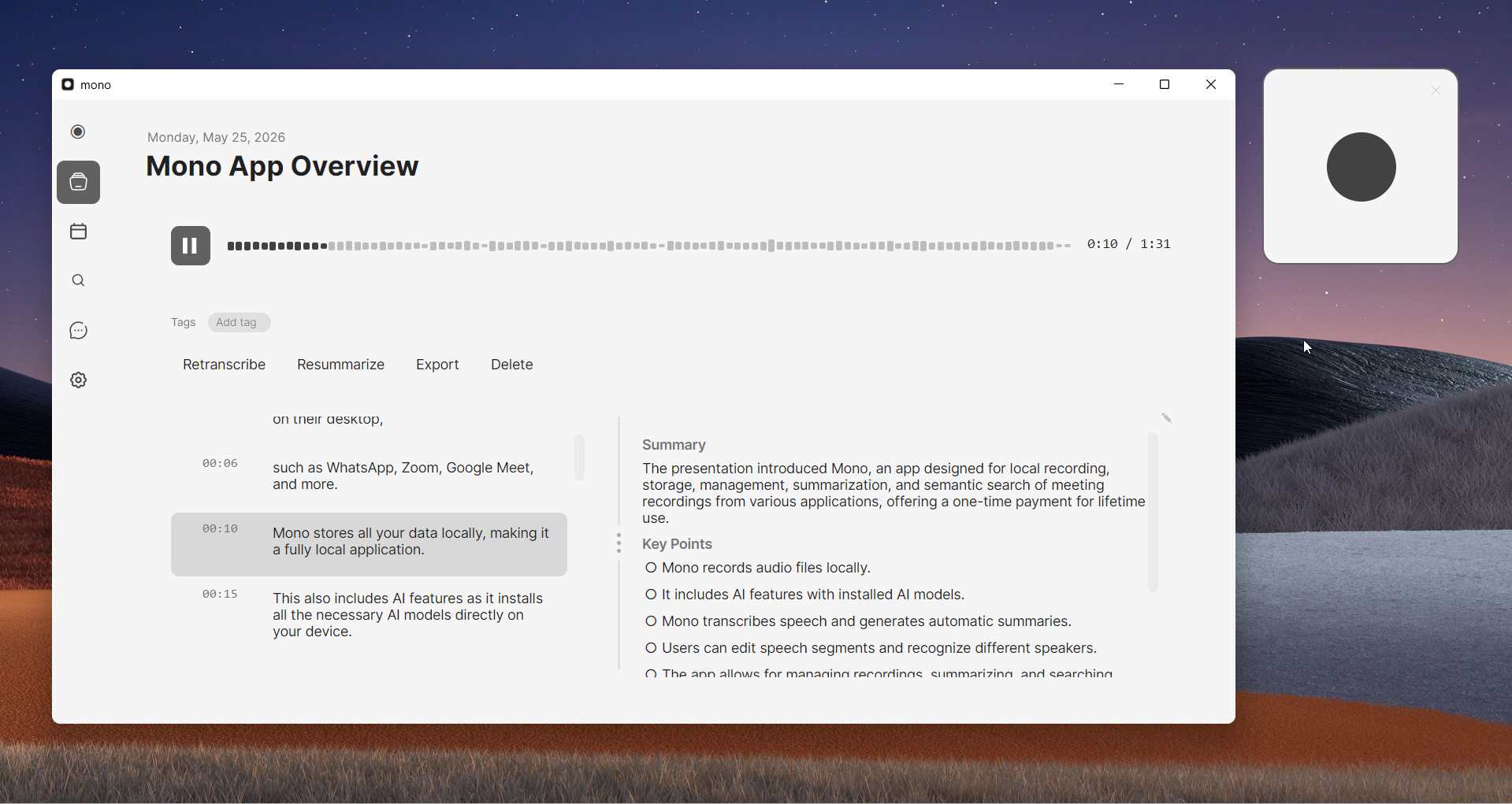
It's the strongest fit for: solo and small-firm practitioners without IT staff to vet vendors or negotiate BAAs; privileged, attorney-side conversations (case strategy, client intake); in-person consultations where bots don't fit and the stakes are highest; practitioners in two-party-consent states who want full control of when recording starts; and anyone who must be able to own and permanently delete the file themselves — to honor a client's deletion request or scope a litigation hold.
It's honestly not the right tool if you need speaker-attributed deposition or witness transcripts — mono has no speaker diarization, so "who said what" isn't reliable; if your firm runs on Clio/MyCase and wants notes auto-filed to the matter; if you need mobile or field capture (mono is desktop-only); or if you want prebuilt legal templates and enterprise admin controls. Those are real gaps, and for litigators or larger firms they may be decisive.
The Other Tools, In Depth
VXT Meet — the legal-native pick
VXT is the one notetaker built for law firms rather than merely adopted by them. It's bot-free, captures both virtual and in-person meetings, labels speakers, and — its real differentiator — integrates with 30-plus legal platforms including Clio, LEAP, Actionstep, Smokeball, MyCase, Filevine, NetDocuments and iManage, auto-filing each note to the correct matter and logging billable time. If your bottleneck is getting notes into the right matter file without copy-paste, nothing else here comes close. The trade-off is the category trade-off: it's cloud-processed and subscription-based, so the privilege and ownership calculus is the cloud one — the conversation reaches VXT's servers, not just your disk.
Basil AI — on-device, but Apple-only
Basil is the closest philosophical cousin to mono: it processes on-device using Apple's foundation models and markets straight at lawyers on the privilege-and-no-cloud argument. If you live entirely in the Apple ecosystem it's a genuinely good answer, with Apple Notes, iCloud and Shortcuts hooks. The catch is right there in the pitch — it's iPhone/iPad/Mac only, a non-starter for the many firms on Windows, and it has no practice-management integration.
Granola and Krisp — bot-free, but not on-device
Both are bot-free and polished, which is why lawyers try them — but neither is the privacy answer it looks like. Granola captures audio locally and then sends it to the cloud for transcription, deletes the audio afterward, and never hands you the recording; its speaker labelling is limited to "me / them" on desktop. Krisp runs English transcription on-device but processes other languages and its AI summaries in the cloud, and likewise keeps no audio file. Bot-free is an etiquette feature, not a confidentiality one — for privileged work, where the audio is processed is what decides the privilege question.
Circleback and Bluedot — strong transcripts, no legal filing
If your priority is accurate, speaker-attributed transcripts, these two do that well — Circleback has particularly strong diarization across 100-plus languages, and both can run bot-free. But their integrations are CRM and productivity (HubSpot, Salesforce, Notion), not legal, so notes don't auto-file to a matter, and both are cloud-processed subscriptions. Think of them as better general transcription than the bot incumbents — without solving the privilege or the legal-workflow problem.
Plaud — a hardware option for in-person and mobile
Plaud is a different shape entirely: a credit-card-sized hardware recorder with a cloud companion app, marketed with legal glossaries and aimed at face-to-face intake, signings and field work — the mobile, in-person niche that desktop apps can't reach. It labels speakers. The catch is a device cost plus an annual subscription, and transcription is cloud, so the same data-residency questions apply the moment the audio leaves the device.
Otter, Fireflies and Fathom — the bot-based incumbents
These are the mature, feature-rich tools — speaker labels, CRM integrations, mobile apps, generous free tiers — and for non-privileged internal calls they're perfectly reasonable. But by default they join as a visible bot and store your audio in their cloud, which is exactly the "silent guest" the bar guidance tells lawyers to disable for privileged conversations. Otter is currently facing a class action alleging it recorded participants without all-party consent and used the audio to train its models; Fireflies states it doesn't train on customer content, and Fathom lets you download the audio and video. But all three are cloud-by-default and bot-by-default — the posture lawyers are increasingly moving away from.
FAQ
Does using an AI notetaker waive attorney-client privilege?
It can. Privilege survives only while a communication stays confidential, and a cloud notetaker is a third party that receives it. In United States v. Heppner (S.D.N.Y., Feb 2026) a judge held material run through a consumer AI tool was protected by neither privilege nor work-product, because the tool's data terms destroyed any reasonable expectation of confidentiality. An on-device tool where the audio never leaves your computer avoids that third-party disclosure — though you still need consent and competence.
Is an AI notetaker HIPAA or ethics compliant for lawyers?
It depends on how you use it, not the brand. Ethically, ABA Opinion 512 and state bars require client consent, confidentiality, competence and vendor supervision. For HIPAA-covered data, a cloud vendor almost always needs a signed Business Associate Agreement plus encryption and access controls. A tool that keeps data on your own device reduces that exposure, because the conversation is never disclosed to a vendor in the first place.
Can I record a client call as a lawyer?
Yes, with consent — and the ethics bar is higher than the wiretap statute. NYC Bar Opinion 2025-6 says clients must be notified and consent obtained whenever an AI system records them, even in one-party-consent states. In all-party-consent states everyone must agree, and the stricter state's law governs cross-state calls. Announce it, get consent, document it.
Will the vendor use my client data to train its AI?
With a cloud tool you have to read the terms — some say they don't, while Otter.ai was hit with a class action alleging it used recordings to train its models. With an on-device tool the data is never transmitted, so it physically can't be added to a training set.
What's the best AI notetaker for a solo attorney?
For a solo who wants maximum confidentiality, in-person intake capture, ownership of the file and no subscription, an on-device recorder like mono (one-time price, data stays local) is a strong fit. If you instead need automatic Clio filing, mobile capture, or speaker-attributed deposition transcripts, choose a tool built for those — you'll trade some privacy control for workflow.
Can I use an AI transcript for a deposition or the record?
Treat AI transcripts as drafts that need human verification, not certified records — depositions are still governed by court reporters. And a tool without speaker diarization (mono has none) can't reliably attribute who said what, which makes it a poor fit for depositions, witness interviews and multi-party negotiations. Use a diarization-capable tool, or a court reporter, where attribution matters.
References & Sources
- United States v. Heppner (S.D.N.Y., Feb. 2026) — privilege/work-product waiver from consumer AI use — Harvard Law Review.
- NYC Bar Formal Opinion 2025-6 (Dec. 22, 2025) — AI recording, transcribing and summarizing client conversations.
- ABA Formal Opinion 512 (2024) — generative AI and the Model Rules.
- Smith Anderson — "The Silent Guest in Your Meetings" — legal risks of AI note-takers.
- Brewer v. Otter.ai — AI note-taking class action — National Law Review.
- Recording Law — all-party (two-party) consent states.