A few years ago, recording a meeting meant a bot called "Otter.ai Notetaker" appearing in the participant list for everyone to see. In 2026 that feels intrusive, and a whole category of bot-free AI note takers has grown up to avoid it — they capture audio from your device directly, so nothing ever joins the call.
But "bot-free" has quietly become a marketing badge that hides more than it reveals. It tells you a bot won't join — it tells you nothing about whether your audio is sent to a server, or whether you'll ever get the recording back. This guide maps the whole field and sorts it by the questions that actually matter.
TL;DR
- Bot-free ≠ private. Most bot-free tools still send your transcript to the cloud
- On-device + keeps your files: mono, Meetily, Hyprnote
- On-device but text-only: Hedy, TwinMind, Krisp
- Bot-free but cloud-processed: Granola, Jamie, Tactiq, Bluedot, Fellow
What "Bot-Free" Actually Means (and What It Doesn't)
A bot-free note taker records the meeting by capturing your computer's own audio, instead of dispatching a separate participant to sit in the call. The upsides are real: nothing appears in the participant list, it works for in-person meetings and any app, and you never need host permission. But when you're choosing a tool, "bot-free" is only the first of three separate questions:
- 1. Does a bot join the call? This is the "bot-free" question. It's about etiquette and reach — no awkward participant, works in person.
- 2. Where is the audio processed? On-device means the audio never leaves your computer. Cloud means it's uploaded to a vendor's servers for transcription and summarising. This is the privacy question — and most "bot-free" tools are still cloud.
- 3. Do you get to keep the recording? Many tools keep only text and delete or never save the audio, so you can't re-listen to verify a quote or archive the call. This is the ownership question.
A tool can be bot-free and still upload everything to the cloud and hand you nothing but a summary. The table below scores every option on all three.
Bot-Free AI Note Takers Compared
| Tool | Bot? | Processing | Keep the audio? | Platforms | Price |
|---|---|---|---|---|---|
| mono | No | On-device | Yes — local file | Windows, macOS | $50 once |
| Hyprnote | No | On-device | Local files | macOS | Free (open source) |
| Meetily | No | On-device | Text only | macOS, Windows | Free / $10/mo |
| Hedy | No | On-device | None | Mac, Win, iOS, Android | From $12.99/mo |
| TwinMind | No | On-device | None | iOS, Android, Chrome | From $12.50/mo |
| Krisp | No | Hybrid | None | Windows, Mac, Linux | From $8/mo |
| Granola | No | Cloud | None | Mac, Win, iOS | From $18/mo |
| Jamie | No | Cloud | None | Mac, Win, iOS | From €25/mo |
| Tactiq | No | Cloud (captions) | Transcript only | Chrome | From $8/mo |
| Fellow | Optional | Cloud | Cloud only | Desktop, mobile | From $7/user/mo |
| Otter / Fireflies / Fathom | Yes (bot) | Cloud | Cloud only | Web, mobile | From $8–19/mo |
"Keep the audio?" — Local file means an audio file on your own disk; Text only / Transcript only means you get the text but no recording; None means the tool keeps neither (it deletes or never stores the audio); Cloud only means the recording exists, but on the vendor's servers.
The Most Private: Bot-Free AND On-Device
If privacy is why you want bot-free in the first place, these are the tools that matter: the audio is transcribed and summarised on your own machine, so it never reaches anyone's server.
mono — Bot-free, on-device, and you keep the files (Recommended)
mono captures your computer's audio with no bot, and runs everything — transcription, summaries, semantic search, AI chat — locally on your machine. Nothing is uploaded. What sets it apart from the rest of this list is ownership: every recording is saved as a plain audio file plus a markdown transcript on your own disk, so you can replay the call, verify a quote, export it, or drop it into Obsidian. Almost every other bot-free tool keeps only text.
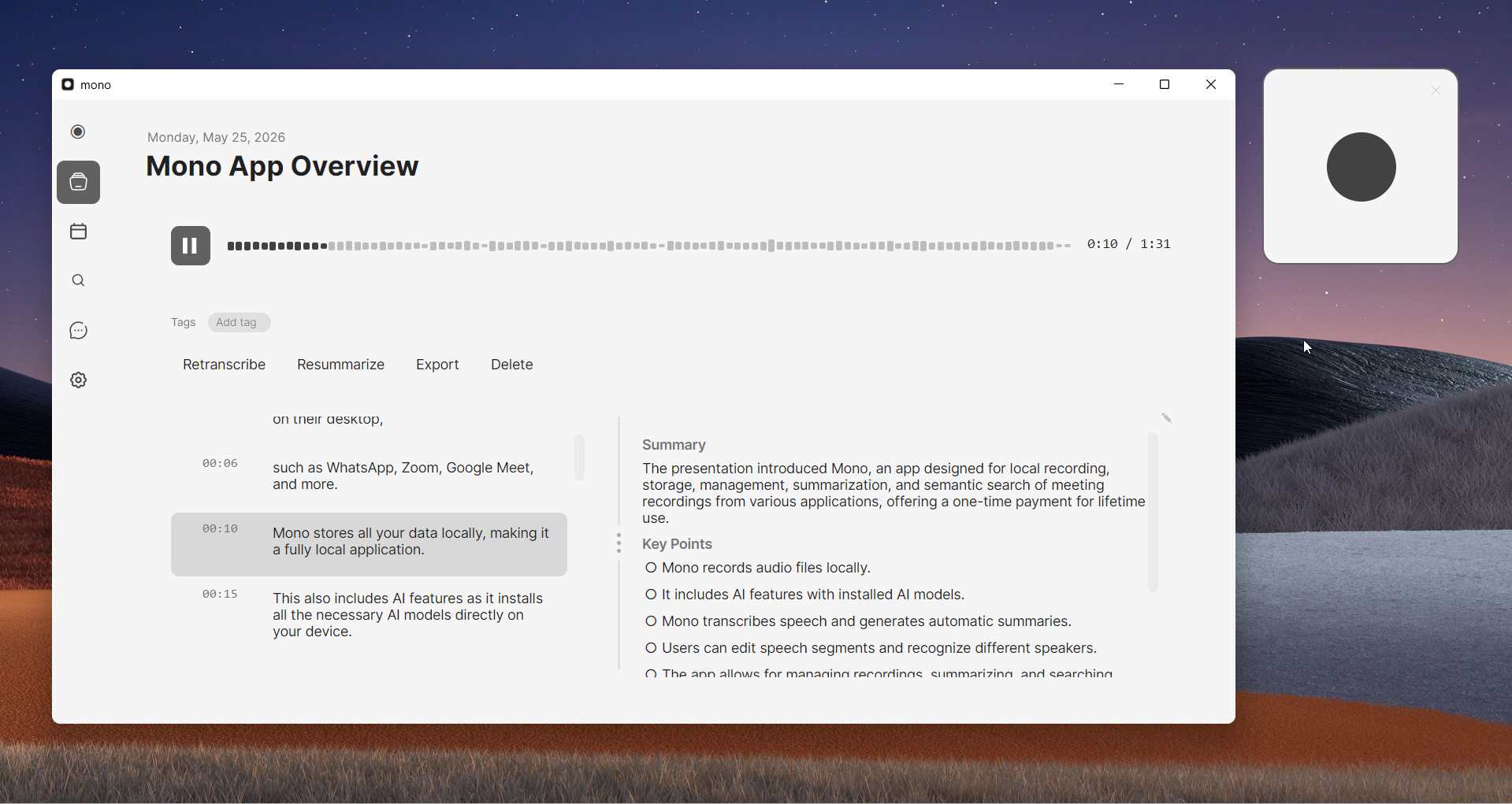
It's a one-time $50 (no subscription), works with any app that plays audio — Zoom, Teams, Meet, Slack huddles, Discord, even desktop phone calls — and has live notes during the call plus Google Calendar integration. The trade-off: Windows and macOS only, no mobile, and it needs a reasonably modern computer for the local AI.
Best for: anyone who wants bot-free recording that's genuinely private and leaves them owning the audio and transcript, without a subscription.
Hyprnote — Open-source local notepad
Hyprnote (a YC-backed open-source project, recently rebranded Char) is a markdown-first notepad that records and summarises meetings entirely on-device using Whisper and a local LLM. It's free, keeps your files locally, and is a great fit if you live in markdown and are comfortable with newer, rougher software. macOS-focused.
Meetily — Open-source, self-hosted
Meetily is open source (MIT) and runs 100% locally with Whisper/Parakeet transcription and Ollama summaries. It's bot-free and works with any platform, but it captures only text — there's no audio file to keep — and it expects you to set up and self-host it. The Community Edition is free; a Pro tier starts at $10/user/mo.
Hedy — On-device, with real-time coaching
Hedy is less a recorder and more a real-time meeting coach: it captures system audio on-device and surfaces live talking points, questions and nudges on your screen during the conversation — useful for sales, consulting and interviews. It's bot-free, GDPR-compliant with a HIPAA assessment, and runs across Mac, Windows, iOS and Android. It keeps notes, not an audio file. From $12.99/mo with a small free tier.
TwinMind — On-device "second brain"
TwinMind transcribes on-device in 140+ languages and is built as a personal memory system — it deliberately transcribes without recording, deleting the audio within seconds and keeping only text on your device (with optional encrypted cloud backup). It's mobile-first (iOS, Android, Chrome extension) and privacy-forward, but you never get an audio file. Free tier; paid from about $12.50/mo.
Krisp — Bot-free, plus the best noise cancellation
Krisp grew out of best-in-class noise cancellation. Its noise removal and English transcription run on-device, but other languages and the AI summaries are processed in its secured cloud — so it's a hybrid, not fully local. It keeps notes and transcript but no audio recording. Windows, Mac and Linux, from $8/mo.
Bot-Free, but Cloud-Processed
These tools don't send a bot, but they do send your transcript (and often the audio) to their servers for AI processing. They're often the most polished — just don't mistake bot-free for private.
- Granola — the slickest of the bunch: you take rough notes and its cloud AI cleans them up. But it's a subscription, cloud-processed, and won't export the audio. Mac, Windows, iOS; from $18/mo.
- Jamie — records locally, processes in the EU cloud, and supports 100+ languages with speaker memory. Subscription, no audio export. From €25/mo.
- Bluedot — a bot-free, browser-based recorder that captures across Zoom, Meet, Teams and Slack in 100+ languages. Cloud. From $14/mo.
- Tactiq — a Chrome extension that reads live captions on Meet, Zoom and Teams, so there's no bot and no raw-audio recording — just the transcript. From $8/mo.
- HappyScribe — a transcription company with a bot-free browser recorder, best when you need high-accuracy transcripts and editing. Cloud.
- Fellow — built for teams: it offers both botless and bot recording with enterprise governance and admin controls. Cloud storage. From $7/user/mo.
- Mem — really an AI "second brain" notes app that can also record and summarise meetings; pick it if you want meetings inside a broader knowledge base rather than a dedicated recorder. Cloud; about $15/mo.
- Cluely — a real-time, deliberately "undetectable" on-screen assistant. It's bot-free and cloud-based, but its whole pitch is hidden coaching, which makes it a poor fit for anyone who values disclosure. From $19.99/mo.
The Bot-Based Tools (and Why People Are Leaving)
Otter.ai, Fireflies, Fathom and tl;dv are the tools that popularised AI meeting notes — and the reason "bot-free" exists. By default they send a visible bot to join your call and store your audio in their cloud. They're mature and integration-rich (CRM, team features, mobile apps), so they still make sense for teams that don't mind the bot.
But a faceless "Notetaker" in the participant list changes how people talk, doesn't work for in-person meetings, and sometimes needs host permission. That discomfort is exactly what pushed the whole industry toward the bot-free tools above.
Which One Should You Pick?
- Most private + you own the recording: mono (one-time, keeps audio + transcript) or, if you're technical, Meetily or Hyprnote (open source, local).
- Free and open-source: Hyprnote or Meetily.
- Polished and you don't mind the cloud: Granola.
- Lots of languages: TwinMind (140+) or Jamie (100+).
- Real-time coaching during the call: Hedy.
- Noisy rooms: Krisp. Team governance: Fellow. Already deep in a CRM: Fireflies or Otter.ai (bot-based).
FAQ
What is a bot-free AI note taker?
One that records a meeting by capturing your computer's audio directly, instead of sending a separate bot to join the call. Nothing appears in the participant list, it works for in-person meetings, and it needs no host permission.
Does bot-free mean private?
No. Bot-free only means no bot joins. Many bot-free tools still upload your transcript to the cloud. For real privacy, choose on-device processing — mono, Meetily, Hyprnote, Hedy or TwinMind — where the audio never leaves your computer.
Which bot-free note taker lets me keep the audio?
Most don't — Granola, Jamie, Krisp, Hedy and TwinMind keep only text. mono saves both the audio file and a markdown transcript on your own disk, and Hyprnote (open source) also keeps files locally.
Are Otter, Fireflies and Fathom bot-free?
No. By default they join your meeting as a visible bot and store your audio in their cloud — the exact model bot-free tools were built to avoid.
What's the best bot-free AI note taker for privacy?
Tools that run on-device and keep your files: mono (one-time price, keeps audio + transcript), Meetily and Hyprnote (open source, local). Everything is processed on your computer, so the audio never reaches a vendor's servers.